Skorax · Android guide
Sheru Bhai Game Controls: Walking, Driving and Flying
Sheru Bhai game controls: every button, by mode
The touch layout in Skorax's game changes with what you are doing. A button that steers a car does nothing useful while you are walking, and the phone button behaves differently in the air. This page goes through the four modes you will actually use, and what to do when a control refuses to respond.
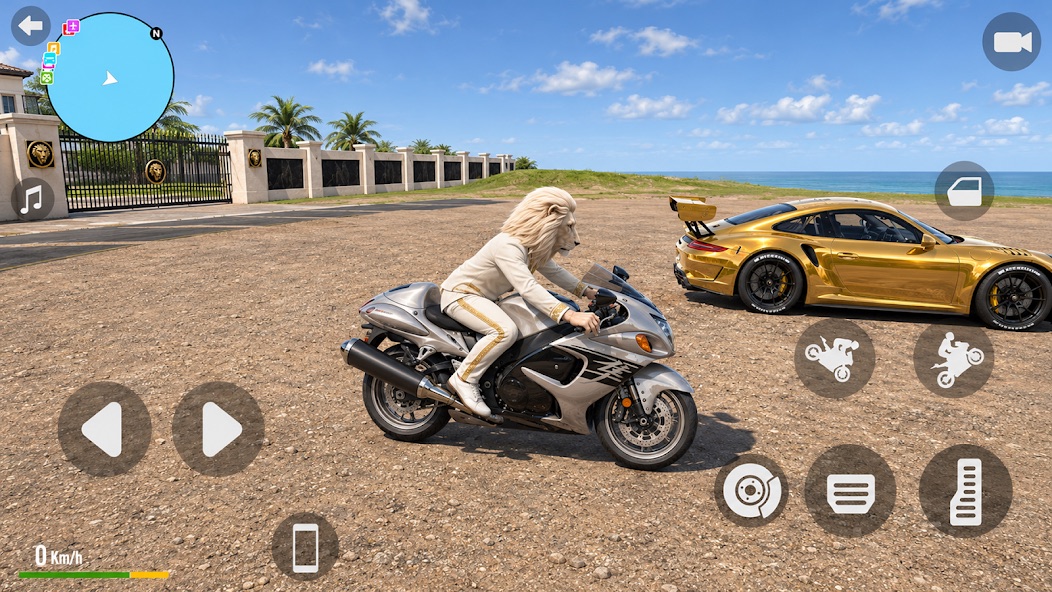
In-game screenshot from the Skorax listing. The movement control sits on one side of the screen and the action buttons on the other.
The screen at a glance
On foot, driving and flying all share the same frame: a movement or steering control on one side, action buttons on the other, and a phone button for Sheru Bhai's apps. Two things change as you switch modes: which actions the buttons trigger, and how the camera follows you.
New players usually lose their first vehicle because they keep pressing the on-foot jump or run button while driving. When you get in, look at the buttons again before you accelerate.
Walking controls
The on-foot set is the one to learn first, because you use it to reach every vehicle and every room:
- Movement: a stick or directional pad moves Sheru Bhai. Small nudges are enough indoors, where doorways are narrow.
- Run: holding the movement further, or the dedicated run button depending on build, increases speed. Running into a door frame usually stops you, so walk through interiors.
- Jump or interact: the action button at the mansion gate, doors and the wardrobe.
- Camera: drag on an empty part of the screen to turn the view. This is the fix for most "I cannot get through this door" problems: the camera is looking from an angle that pushes you into the frame.
Phone controls
The phone button opens Sheru Bhai's apps. Skorax lists Vehicle, Camera and Bank, and the phone is also where you change the look of equipment. Treat it as a menu rather than a mini-game: open it, pick one thing, close it.
If the phone will not open, you are probably still inside a vehicle. Exit first, then tap the phone.
Driving controls
Inside a car or on a motorbike the buttons switch to vehicle mode:
- Accelerate is usually the lower right button. Tap it repeatedly for a gentle start rather than holding it flat out.
- Brake and reverse is the button next to it. Reversing slightly then turning is the fastest way out when you are wedged against a wall.
- Steer left and right, again with small inputs. The road near the mansion has tight bends.
- Exit puts you back on foot. Look for it before you drive into a dead end, not after.
A motorbike turns faster than a car but falls over more easily on the hill road. If you are still learning, take a car on the highway first and come back to the bike later.
Flying controls
Jets and the helicopter add a vertical dimension, and the buttons change again:
- Throttle or lift raises you. Hold it until you are clear of buildings before turning.
- Pitch tips the nose down to descend or up to climb. Small taps, not long holds, especially near the ground.
- Yaw or turn rotates the aircraft. At low speed the turn is slow, so plan your approach early.
- Landing is the part that catches people out. Cut throttle gently and keep a long, clear stretch ahead of you; landing on a street between buildings rarely ends well.
When a control will not respond
- You are in the wrong mode. Check what you are standing in or sitting in. Buttons do not carry over between walking, driving and flying.
- The touch is being read as a hold. Release and tap again; holding a button that expects a tap does nothing in some builds.
- The game is stuttering. Close background apps. Skorax advertises offline play, so connection is rarely the cause once installed.
- The camera is against a wall. Turn the view, then walk. The character moves relative to the camera, not the map.
Making the layout easier
Two habits help more than any settings change: keep your thumbs off the middle of the screen so the camera has room to drag, and look at the action buttons every time you change mode. Most control complaints in this game are one of those two.
Related pages
Our first ten minutes walkthrough puts these controls in order, from the mansion gate to your first flight. If you have not installed the game yet, the download guide covers the official listing and the checks that keep you off repackaged files. The guide home page has the game overview.